Forward Deployed AI Engineering · built in a real operation
From the enquiry inbox to a reviewed quote.
The Solar CRM grew around the work of a real installation business. It connects enquiries, leads, quotes, materials, and operational handovers. The CRM Agent helps with ambiguous text and documents. Deterministic rules and human approvals control anything that changes prices, documents, or external systems.
This example shows the internal CRM used in the solar installation business Paul Kahle also operates. It is not an anonymized client engagement.
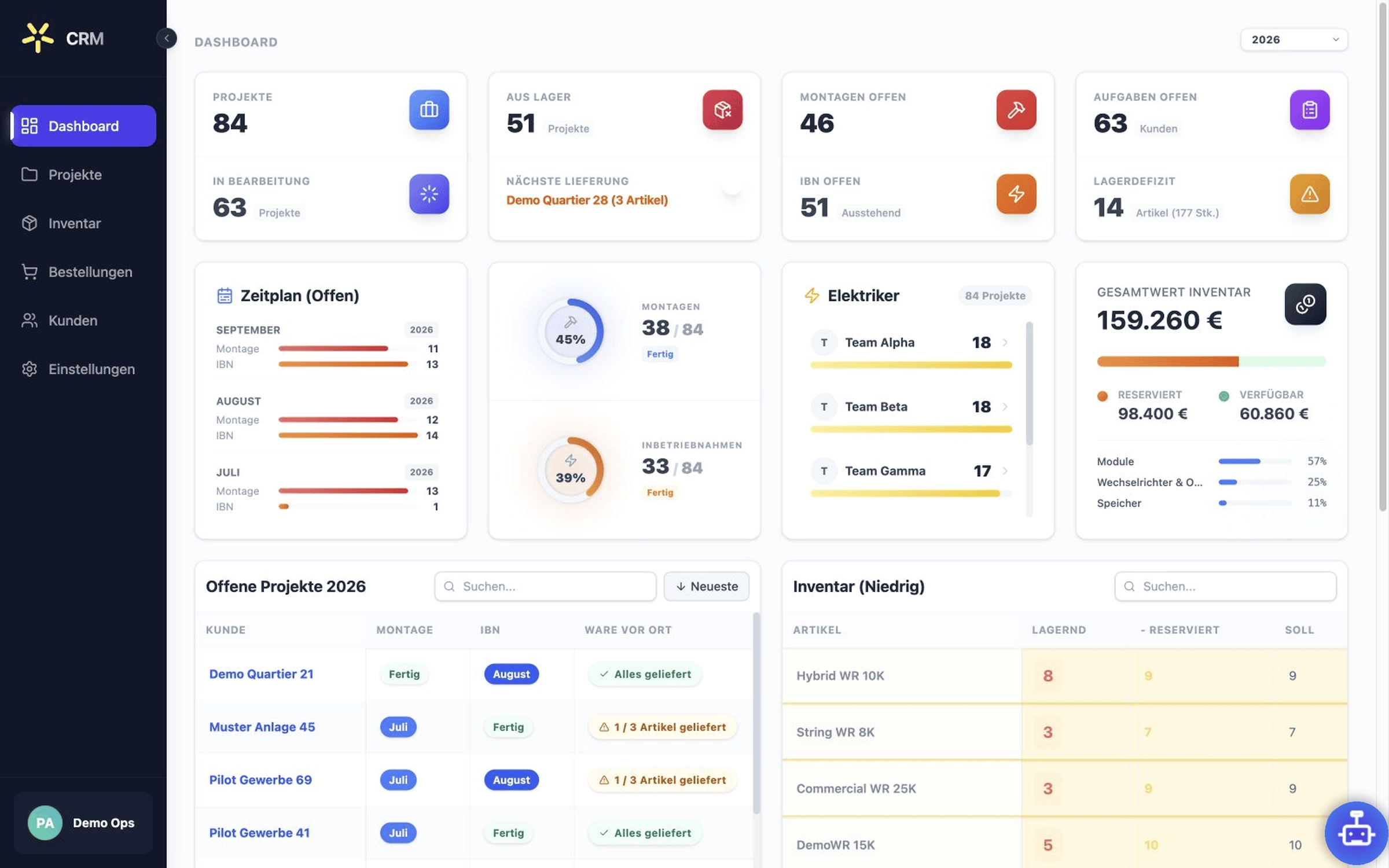
At a glance
A solar installation business runs daily work through software built around it.
- Operation
- An internal system for a real solar installation business.
- Scope
- From secure enquiry intake to reviewed quotes, material demand, and operational handovers.
- Role
- Paul Kahle built the CRM as a Forward Deployed AI Engineer, working directly from the daily operation of the business.
- Reviewed release
- CRM 0.28.0, reviewed 27 July 2026. Feature statements on this page refer to that release.
The operating problem
The work happens between the inbox, CRM, and accounting software.
An enquiry is not finished when someone reads an email. Contact details have to be checked, possible duplicates must be handled, the next action has to be assigned, and prices, materials, and handovers later need to stay traceable.
Standard software covers individual parts. The actual workflow often lives between them: in inboxes, follow-up questions, manual approvals, and knowledge held by individual people.
That is where Forward Deployed AI Engineering starts: with the workflow as it actually happens, not a generic feature list. The CRM was built around those handovers and grows when the operation needs a specific rule, view, or decision.
End-to-end workflow
Every step stays visible from intake to handover.
Release 0.28.0 connects the following steps. In daily operations, each case takes only the path it needs. Open questions and exceptions remain visible.
- 01
Capture the enquiry securely
Signed inbound events are accepted and the original is stored privately. Known formats are parsed with deterministic rules.
- 02
Structure unclear details
Only when an input is unclear may the AI agent suggest matching fields. Its uncertainty remains visible.
- 03
Review the intake
The team can see the source, original, extracted details, and open questions. An email never becomes a lead through automation alone.
- 04
Create the lead
A person decides whether to import it, who owns it, and what happens next. Status and activity remain attached to the case.
- 05
Calculate the quote
Product data, purchase and customer prices, and calculations come together. Price and calculation require explicit review.
- 06
Prepare the Lexware draft
Contact and document details are previewed again before a Lexware handover. The system creates only an editable draft and sends nothing by itself.
- 07
Record the material flow
Demand is assigned to projects and suppliers. Ordering, goods receipt, and reservation remain separate visible steps. The purchase itself is not triggered autonomously.
Inside the product
The CRM stops before uncertainty becomes an action.
These dialogs come from the reviewed release. Missing information, approvals, and external handovers appear exactly where a person needs to decide.
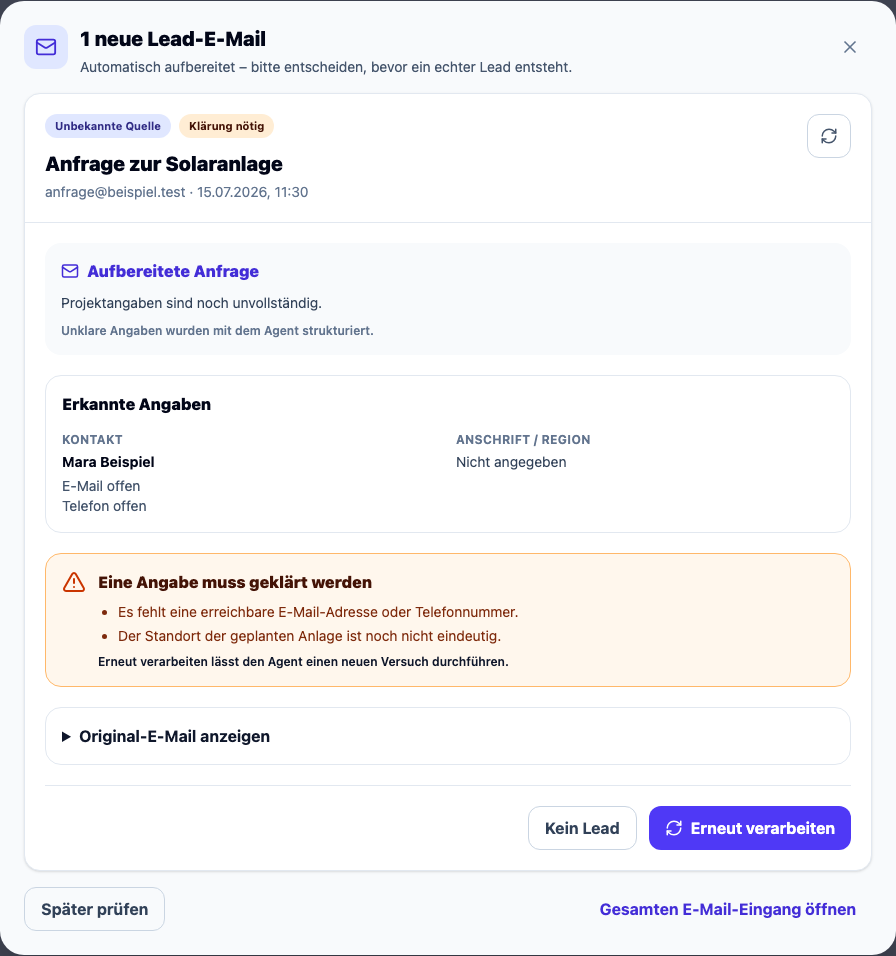
Missing details stay open
Missing contact and location details remain visible. No lead is created without a human decision.
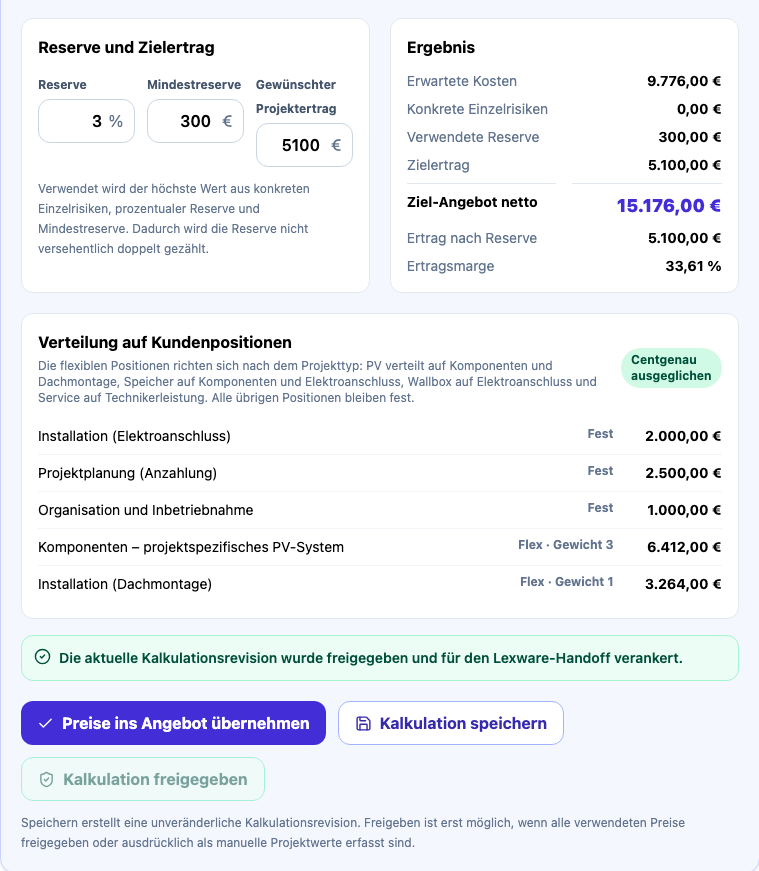
Approval applies to this exact revision
The internal allocation is balanced to the cent, saved, and explicitly approved for the Lexware handoff.
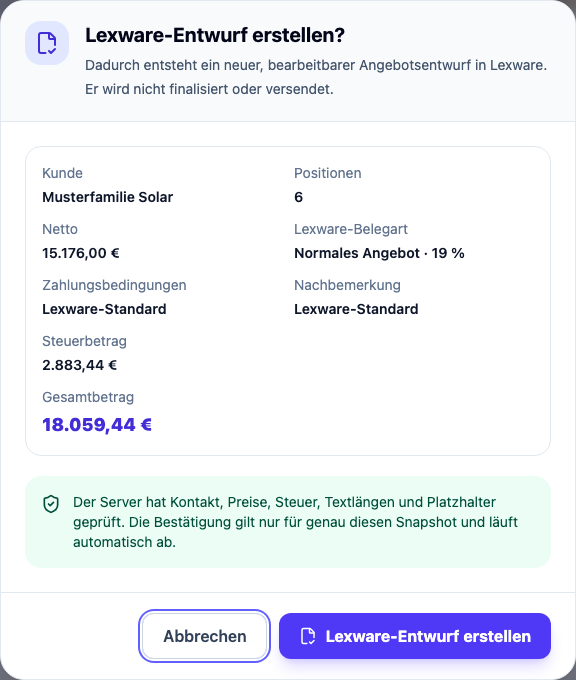
Lexware receives an editable draft
The CRM prepares only an editable draft. The snapshot is checked server-side, and nothing is finalized or sent.
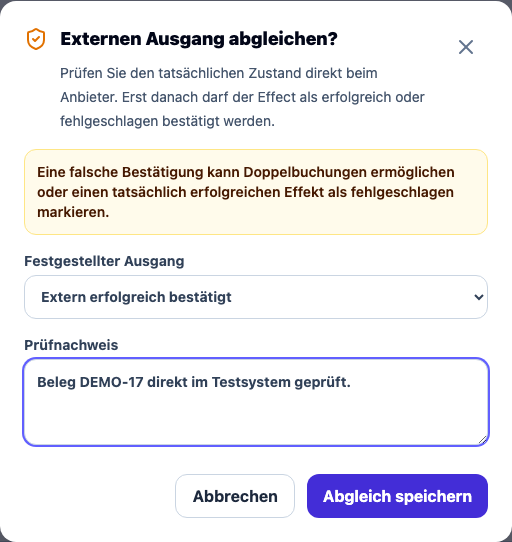
An uncertain outcome blocks replay
An unknown external outcome is reconciled only after evidence is documented. Replay remains blocked until then.
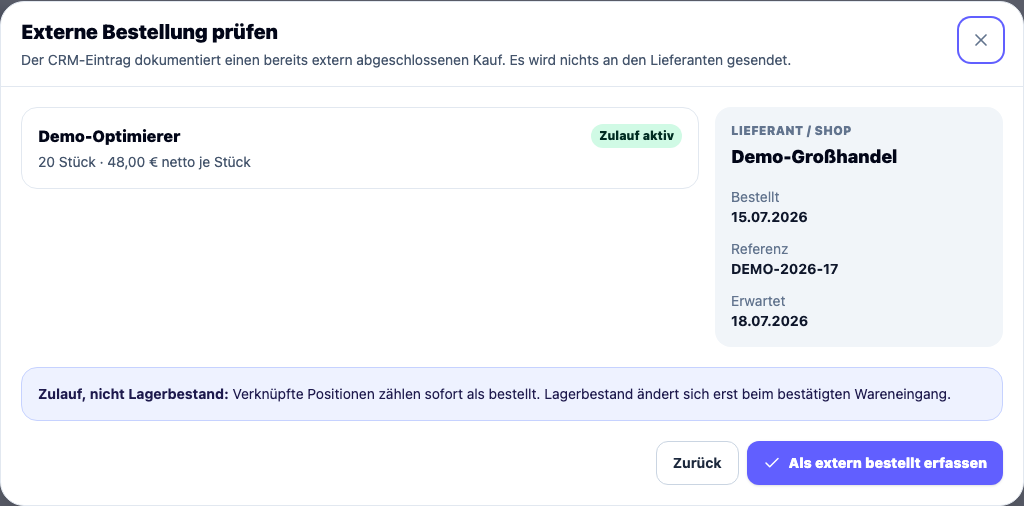
Record the external purchase in the CRM
The CRM records a purchase already completed externally and sends nothing to the supplier.
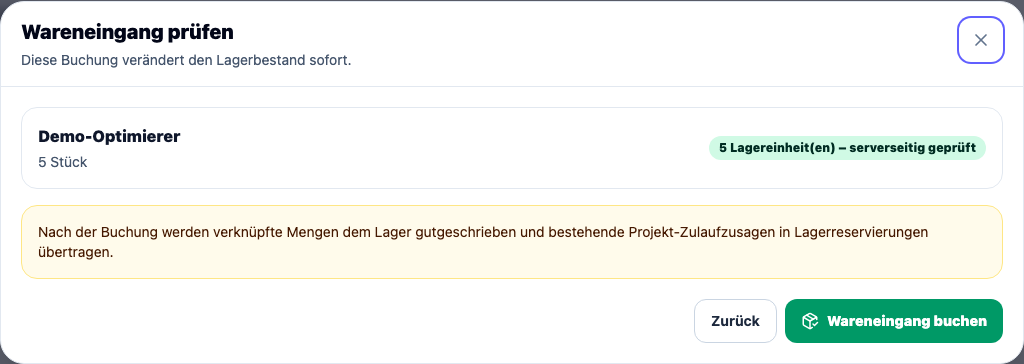
Review goods receipt before posting
Its effect on inventory and project reservations is checked separately before posting.
Rendered from components in the reviewed CRM release 0.28.0 with purpose-made synthetic data. No customer data and no live connections. The CRM interface is shown in its original German.
Division of work
Deterministic rules, the CRM Agent, and people do different jobs.
Known rules belong in predictable software. The AI agent works where language or documents need interpretation. Commercial and consequential decisions stay with a person.
Calculate, validate, and store
Rules, calculations, and safeguards should produce the same result from the same input.
- verify signatures and permissions
- catch repeated events
- store status and next actions
- process prices and calculations reproducibly
- record retries, queues, and evidence
Understand text and prepare work
The CRM Agent structures unclear inputs, retrieves information, and prepares reversible working states. Results remain visible and reviewable.
- structure ambiguous enquiry text
- suggest fields from ambiguous text
- search documents with source references
- prepare reversible leads and quote workspaces
Prices, commitments, and external actions
Commercial and consequential decisions are not handed to a model or a background process.
- promote an enquiry to a lead
- resolve uncertain customer matches
- approve price and calculation
- review and send external documents
- place orders or create other commitments
AI agents, agent workflows, and RAG
The CRM Agent uses tools, and every run remains traceable.
Release 0.28.0 includes an Agent Center for bounded tasks. The agent works through approved CRM tools while calculations, permissions, and consequential actions remain under server-side control.
Agent workflows with bounded authority
The AI agent may read CRM data within its scope, work on reversible leads, prepare versioned quote workspaces, and create protected proposals. It cannot approve prices, send Lexware documents, or place supplier orders.
Retrieval-augmented generation (RAG) with citations
The document library combines full-text and vector retrieval. The agent answers from the active document revision and cites the document title, revision, and page. Historical or failed revisions stay out of retrieval.
Agent runs with state and recovery
Prompt version, provider, model, reasoning effort, duration, tool calls, and errors stay attached to the run. A stalled run can be interrupted and recovered without blindly replaying a tool or write.
The CRM as a whole is used in daily operations. Which agent and RAG capabilities take part depends on the workflow and case. The version reviewed here is release 0.28.0.
Responsibility areas
Who sees what, decides what, and handles the difficult case?
Enquiry handling
The shared enquiry view brings together the source, original message, recognized details, and open questions.
- View: new inputs, original message, and missing details
- Decision: create a lead or hold the enquiry for clarification
- Escalation: ambiguity and possible duplicates remain unresolved
Quote review
Product data, price evidence, calculation, and approval state remain bound to one specific revision.
- View: current revision, prices, sources, and unresolved blockers
- Decision: approve prices and calculation or return them for correction
- Escalation: changed inputs require another review
Purchasing and delivery
Material demand, supplier allocation, an externally completed purchase, and goods receipt remain separate steps.
- View: demand, allocation, inbound supply, and project reservations
- Decision: record an external purchase and confirm goods receipt
- Escalation: unclear products, quantities, or assignments remain stopped
Workflow operation
The operating view shows not only whether a process ran, but whether the business outcome is actually known.
- View: runs, queues, retries, alerts, and evidence
- Decision: pause, reconcile, or retry deliberately
- Escalation: an uncertain external outcome stays blocked until reconciled
Exceptions
What happens when details are missing or an agent run stalls?
These cases are written down and evaluated before rollout. Each one needs a visible state, a next action, and a named owner.
| Situation | System behavior | Why |
|---|---|---|
| Contact details are missing | The intake stays reviewable and is not treated as a complete lead automatically. | Missing information should cause a precise follow-up, not an invented value. |
| The same event arrives again | Technical and business checks prevent the same event from creating a second unnoticed case. | Providers can redeliver events. A retry must not create a second case. |
| A contact looks similar | The possible match is shown as a hint. Nothing is merged without a human decision. | Similar contact data can mean the same person or a new project. |
| The AI suggestion is contradictory | Uncertainty remains visible and the case is escalated to a person for clarification. | A plausible-sounding suggestion is not yet a reliable fact. |
| An approved calculation changes | Approvals are bound to a specific revision. Changed inputs require another review. | Earlier approval must not be transferred silently to different prices or content. |
| An external action has an uncertain outcome | The system does not retry blindly. It pauses and reconciles the actual state. | An unclear response can mean the external action already happened. |
| An agent run stalls | The run is interrupted when its lease expires. Saved state and possible write effects are inspected before it resumes. | An automatic replay could execute a tool or external action twice. |
Operations
A failure needs a visible state and a named owner.
The reviewed release contains safeguards for intake, background work, agent runs, approvals, and external handovers. They do not promise that nothing will fail. They make sure a named operator notices a failure, stops the workflow, and decides the next step on the record.
Protected intake
Signatures are checked, originals are stored privately, and data access is limited to what the workflow needs.
No silent duplication
Technical, business, and workflow checks prevent a second pass over the same event. Similar customer data stays a review hint.
Bounded retries
Background work runs through queues. A task cannot be picked up twice unnoticed, retries are limited, and failure states stay visible.
Reconcile uncertain outcomes
When the state of an external system is not known with confidence, the workflow stops and checks before risking a duplicate action.
Approval is tied to a revision
Calculations and handovers carry a traceable revision. If the basis changes, the earlier approval is not reused.
Pause and read back the run
Workflows and agent runs can be paused, inspected, and resumed deliberately. Model, duration, tool calls, terminal status, and errors stay on record.
Controlled rollout
A new capability starts without consequential automation.
New integrations, write paths, and agent permissions start without consequential automatic actions. Only evaluated, low-risk steps gain more responsibility in daily use. Approvals remain in place.
- 01
Write down cases and expected behavior
Normal, incomplete, contradictory, and risky cases are described before rollout.
- 02
Run it in observation mode
New integrations, write paths, and agent permissions start without consequential automatic action. Expected and actual behavior are compared.
- 03
Allow bounded daily use
Automation increases only for evaluated low-risk steps. Approvals, pauses, and clear fallback paths stay in place.
- 04
Review exceptions and tighten
Failures, escalations, cost, and latency are reviewed. Rules, test cases, and documentation grow with operations.
Measurement plan
Seven measures for deciding what to improve next.
Each measure gets one definition, an observation window, and enough real cases. Together they show whether the workflow is becoming faster, more reliable, or less costly.
- Enquiry to review-ready record
- Time from confirmed intake to a record that a person can review meaningfully.
- Rules, agent, and clarification
- Share of inputs handled deterministically, handled by the AI agent, or escalated to a person.
- Duplicates and exceptions
- Safely ignored repeats and cases stopped because data is uncertain or contradictory.
- Quote preparation
- Time, manual handovers, price reviews, and revisions until a draft is ready for approval.
- Operational reliability
- Successful runs, retries, stopped cases, uncertain external outcomes, and time to resolution.
- Adoption and fallback paths
- Share of eligible cases handled through the CRM, participating responsibility areas, manual fallback cases, and work that still happens outside the system.
- Cost of agent runs
- Model calls and cost for ambiguous cases, kept separate from deterministic processing.
Your workflow
Which handover costs you time every week?
This CRM grew around one specific business and cannot be dropped unchanged into another company. Describe one concrete workflow and two or three typical cases. Paul Kahle will give you an honest view of what deterministic software should handle, where AI agents genuinely help, and which decisions should stay with your team.
Have your workflow checked